How to Identify Your Audi MMI System in Under 2 Minutes
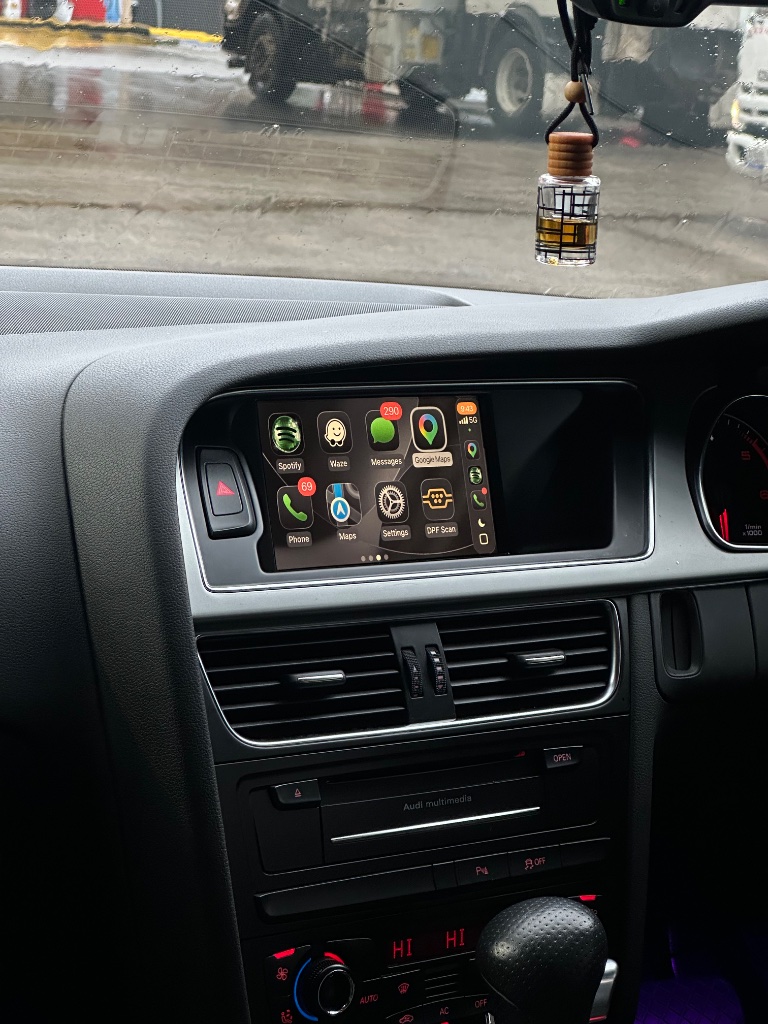
You can identify your Audi MMI system in under two minutes just by looking at your dashboard.
Step 1 - Look at the screen
- Small screen with basic graphics: MMI 2G
- Medium screen (6.5–7 inches) with colour graphics: MMI 3G
- Larger screen (7–8.3 inches): MMI 3G+
- Modern high-resolution screen: MIB
Step 2 - Look at the rotary controller
- Plain rotary dial (no touchpad): MMI 3G
- Rotary dial with smooth touchpad surface: MMI 3G+
Still not sure? Upload a photo on our order page and we'll confirm for free.
Ready to add CarPlay to your Audi?
We confirm your exact car before dispatch. If it isn’t compatible, you get a full refund.
See the Audi CarPlay kitRelated articles
Technical
How to Identify Your Audi MMI Version (2G, 3G, 3G+, RMC & MIB)
Technical
Audi MMI System Types Explained: 2G, 3G, 3G+, MIB
Guide
How to Tell Which Audi MMI System You Have (2G, 3G, 3G+, MIB, MIB3)
Technical
Audi Concert, Symphony and MMI: What Is the Difference?
Technical
Does Adding CarPlay Affect Your Audi MMI or Warranty?
Technical
Audi MMI CarPlay Adapter - Plug and Play, No Coding Required