Audi MIB3 Explained — Which Models Have It and What It Means for CarPlay
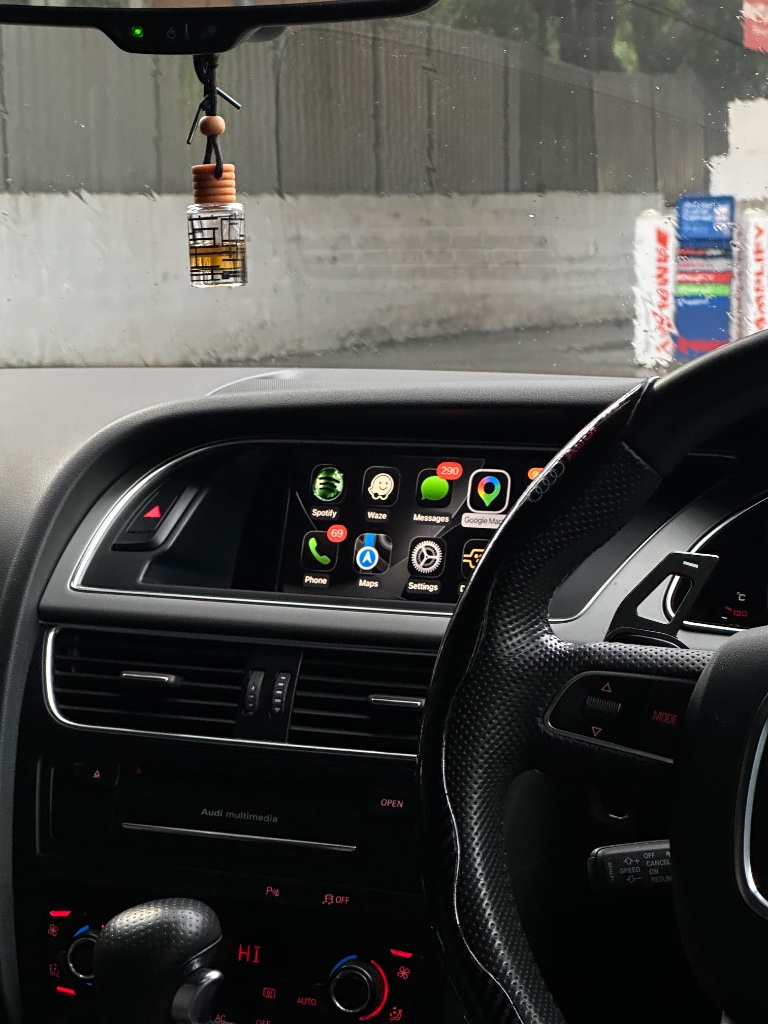
MIB3 is Audi's most recent infotainment platform on our compatibility list, and it appears on several newer models. This guide explains what MIB3 is, which models and years use it, how it differs from the older MMI generations, and the one thing you should check before ordering a CarPlay kit for an MIB3 car.
What MIB3 is
MIB3 is the third generation of Audi's modular infotainment platform (Modularer Infotainment Baukasten). It is a modern touchscreen interface with virtual buttons, faster processing, and higher-resolution graphics than the older MMI 2G/3G/3G+ generations that used a rotary controller in the centre console. If your Audi has a flat touchscreen interface rather than a rotary dial with surrounding buttons, you are on the MIB family — and if it is a 2020+ model, it is most likely MIB3 specifically.
Which models and years use MIB3
On our compatibility list, MIB3 appears on:
- Audi A1 — 2021 to 2023
- Audi A3 — 2021 to 2023
- Audi A4 — 2020 to 2023
- Audi A5 — 2021 to 2023
- Audi Q3 — 2019 to 2022 (note: the 2018 Q3 uses a specific MIB3 variant)
- Audi Q4 — 2019 to 2023
- Audi Q5 — 2021 to 2023
If your car is one of these year ranges, you are likely on MIB3. Confirm with a dashboard photo on the order page before ordering.
How MIB3 differs from older MMI
The older MMI generations (2G, 3G, 3G+, RMC) used a central screen plus a rotary controller in the console with surrounding function buttons. MIB3 uses a touchscreen interface with virtual buttons — no rotary controller, or a much simpler one. The install path is different because the control unit and connectors are different, which is exactly why the kit is matched to the generation. See our MMI identification guide if you are not sure which generation your car has.
The one thing to check first
Because MIB3 is a newer platform, some cars that use it may already have factory CarPlay fitted. Before ordering, check your MIB3 menus — look for a CarPlay or smartphone interface option in the connectivity or media settings. If CarPlay is already there, you do not need a kit. If it is not, our kit adds it. This check is the single most useful thing you can do on a 2020+ Audi before spending anything.
What the install involves
The MIB3 install follows the same plug-and-play principle as every other generation: access the control unit, connect the harness using keyed connectors, mount the module, and test before reassembly. No wire cutting, no coding, no dealer visit. Basic hand tools only. See our installation page for the walkthrough.
Frequently asked questions
What is the difference between MIB and MIB3?
MIB3 is the third generation of the MIB platform — faster, higher-resolution, and newer than MIB1. Both are touchscreen interfaces; MIB3 appears on 2020+ models.
Which Audi models have MIB3?
On our list: A1 (2021–2023), A3 (2021–2023), A4 (2020–2023), A5 (2021–2023), Q3 (2019–2022), Q4 (2019–2023), and Q5 (2021–2023).
Does an MIB3 car already have CarPlay?
Some do. Check your MIB3 menus for a CarPlay or smartphone interface option before ordering — if it is already there, you do not need a kit.
Do I need to code an MIB3 car after fitting?
No. The module self-configures on power-up. No VCDS, no dealer coding.
How do I confirm my car is MIB3?
The year and model are the first clue, but upload a dashboard photo on the order page and we will confirm before dispatch.
Adding CarPlay to an MIB3 Audi
Check for factory CarPlay first, then plug-and-play if it is not there. See the Audi A4 CarPlay page for a popular model example.
View the Kit Check CompatibilityReady to add CarPlay to your Audi?
We confirm your exact car before dispatch. If it isn’t compatible, you get a full refund.
See the Audi CarPlay kitRelated articles
Guide
How to Tell Which Audi MMI System You Have (2G, 3G, 3G+, MIB, MIB3)
Guide
Which Audi Models Support Apple CarPlay? Complete Compatibility List (2026)
Technical
Which iPhones Support Wireless Audi CarPlay? Full Compatibility List
Technical
Audi MIB CarPlay Upgrade - Compatible Models & Installation Guide
Comparison
Wireless vs Wired Apple CarPlay for Audi: Which Is Better?
Comparison
Google Maps vs Audi Navigation: Which Should You Use?